Portfolio
The Portfolio tab provides a detailed overview of your Positions and Holdings, along with profit & loss (P&L) analysis.
Positions
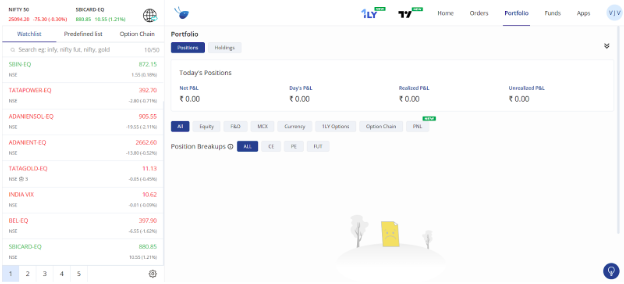
Shows all your open intraday and overnight positions.
Key metrics displayed:
- Net P&L → Total profit or loss across all positions.
- Day’s P&L → Profit or loss for the current day only.
- Realized P&L → Profit or loss booked after closing trades.
- Unrealized P&L → Profit or loss on active (open) trades.
Filters available:
- Equity
- F&O (Futures & Options)
- MCX (Commodities)
- Currency
- Option Chain
- P&L
Position Breakups:
- CE → Call Options
- PE → Put Options
- FUT → Futures Contracts
Holding
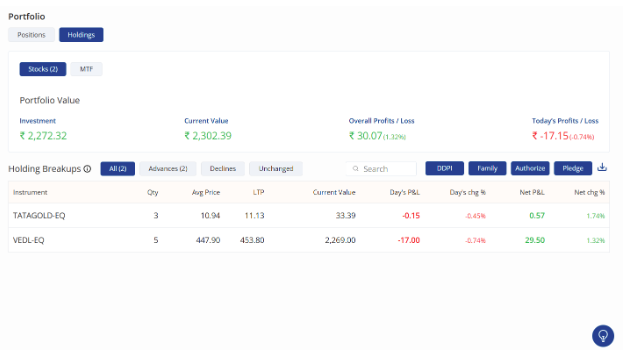
The Holdings tab shows all the stocks in your Demat account along with their real-time value and performance.
Portfolio Value Summary
- Investment → Total invested amount (buy value of holdings).
- Current Value → Present market value of holdings.
- Overall P&L → Profit or loss since purchase (realized + unrealized).
- Today’s P&L → Profit or loss for the current day based on market movements.
Holding Breakups
Each stock in your holdings is displayed with key details:
- Instrument → Stock name & exchange (e.g., TATAGOLD-EQ).
- Qty → Number of shares held.
- Avg Price → Average buy price of the stock.
- LTP (Last Traded Price) → Current market price.
- Current Value → Value of your total holding in that stock.
- Day’s P&L → Profit or loss made during the current trading day.
- Day’s Change % → Percentage change in stock price today.
- Net P&L → Overall profit/loss on that stock since purchase.
- Net Change % → Percentage profit/loss since purchase.
Holding Filters
- All → Displays all holdings.
- Advances → Stocks trading above purchase price.
- Declines → Stocks trading below purchase price.
- Unchanged → Stocks with no price change.
Additional Actions
- DDPI → Authorize Demat Debit for smooth sell transactions instantly.
- Authorize → When you attempt to sell shares from your holdings, you need to authorize the transaction through CDSL e-DIS.
- Pledge → Pledge your shares to avail margin funding.
- Download Icon → Export your holdings report.
The Holdings section helps you track investments, monitor daily & overall P&L, and manage actions like pledging and authorizations.